








 Services
Blog
Français
Services
Blog
Français
Brilliant update for django-jet !
This article was created by Thomas Binetruy as he’s into R&D around Elm for YourLabs but maybe it will help you too !
In this short tutorial, we create a basic counter application that changes the title color based on the counter value. We first define our state model, its transitions, and finally our view - function of our current application state.
Here are the necessary imports:
elm import Browser import Html exposing (Html, button, div, text, h1) import Html.Events exposing (onClick) import Html.Attributes exposing (alt, class, classList, href, src, title, style)
Read More
CRUDLFA+ 0.5.0, g-drive-ish design
Clilabs now benefit a new command that automates a series of 3 lines that’s I’ve been typing over and over again during 10 years of Django hacking.
$ clilabs help +django:settings Setting up django has failed ! DJANGO_SETTINGS_MODULE env var not set ! Show settings from django.
How many times have you done the following ?
python manage.py shell
from django.conf import settings
settings.DATABASES # or something
Well it’s over now ! Try this instead:
Read Morejpic, h4x0|2 & founder @ YourLabs
Phase 1: believe the world is waiting for you, Phase 2: realize the world is not waiting for you, Phase 3: stop waiting for the world.
Sometimes I want to execute a python callback with some args on the command line, but i get frustrated that it always requires to wrap my command in a wrapper of some sort. Then, I want to do generic CRUD operations from the command line in my automation tool. Clilabs unfrustrates me.
Get started:
$ pip install clilabs $ clilabs clilabs automates python callables parametered calls.
Things starting with - will arrive in clilabs.context.
Read Moredjcli is the package , a new CLI under design phase, it is a simple python package, that provides a command with name djcli, to do more with Django on the CLI:
$ pip install djcli
$ export DJANGO_SETTINGS_MODULE=your.settings
$ djcli create auth.user username=pony is_superuser=1
$ djcli chpasswd /path/to/password username=pony
Read More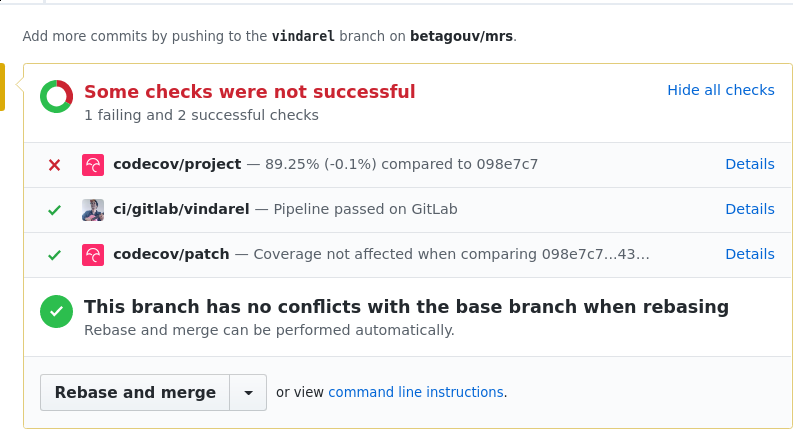
“Extreme DevOps” screenshot, where you see branchname == lastbuildjobname, designed for dynamic environments, demonstrates auto-deploy an environment per push on a subdomain with the branch name. From betagouv/MRS#636, with PlayLabs, currently in Alpha stage.
https://blog.risingstack.com/yarn-vs-npm-node-js-package-managers/
How Facebook spies on Yarn users.